Target Operating Model Builder for IT Leaders
A target operating model sets out how your organisation will run in the future to deliver its strategy, across people, process, technology and the services that support them. For IT leaders, the hardest part is deciding who should own each service: your internal team, a managed provider, a co-managed blend, or a specialist third party. Our free Target Operating Model Builder lets you map that in minutes and leave with an executive PDF you can take to the board.
What is a target operating model?
A target operating model, often shortened to TOM, is a blueprint of how a business intends to operate once it has delivered its strategy. It describes the future state across several dimensions, usually people and structure, process, technology, information, governance and sourcing, and it makes clear how each part fits together to deliver value. A target operating model is not an organisation chart and it is not a project plan. It is the bridge between how a business works today and the way it needs to work tomorrow. If it helps to see the format first, our target operating model examples show how ownership looks for different organisations.
What is an IT target operating model?
An IT target operating model applies the same thinking to the technology function. It sets out how IT services will be delivered, how they will be governed, and, above all, who is accountable for each one. In practice the defining question is sourcing: which services your internal team should run, which are better placed with a managed provider, which work best as a co-managed blend, and which sit with a specialist third party. Getting that mix right is what keeps technology reliable without overloading an internal team or losing control to an outsourcer.
Why a target operating model matters
Every gap or overlap in service ownership is a risk. When no one is clearly accountable for a service, it is the one that fails at the worst moment, and every minute of unplanned downtime costs profitability and customer trust. A clear target operating model removes that ambiguity. It shows the board where the business is exposed, where money is being spent twice, and where a change in sourcing would lift resilience or free the internal team for higher-value work. It also gives IT and the wider leadership team a shared language for the decision. Our IT consultancy can help you get that decision right.
Build your target operating model in minutes, for free
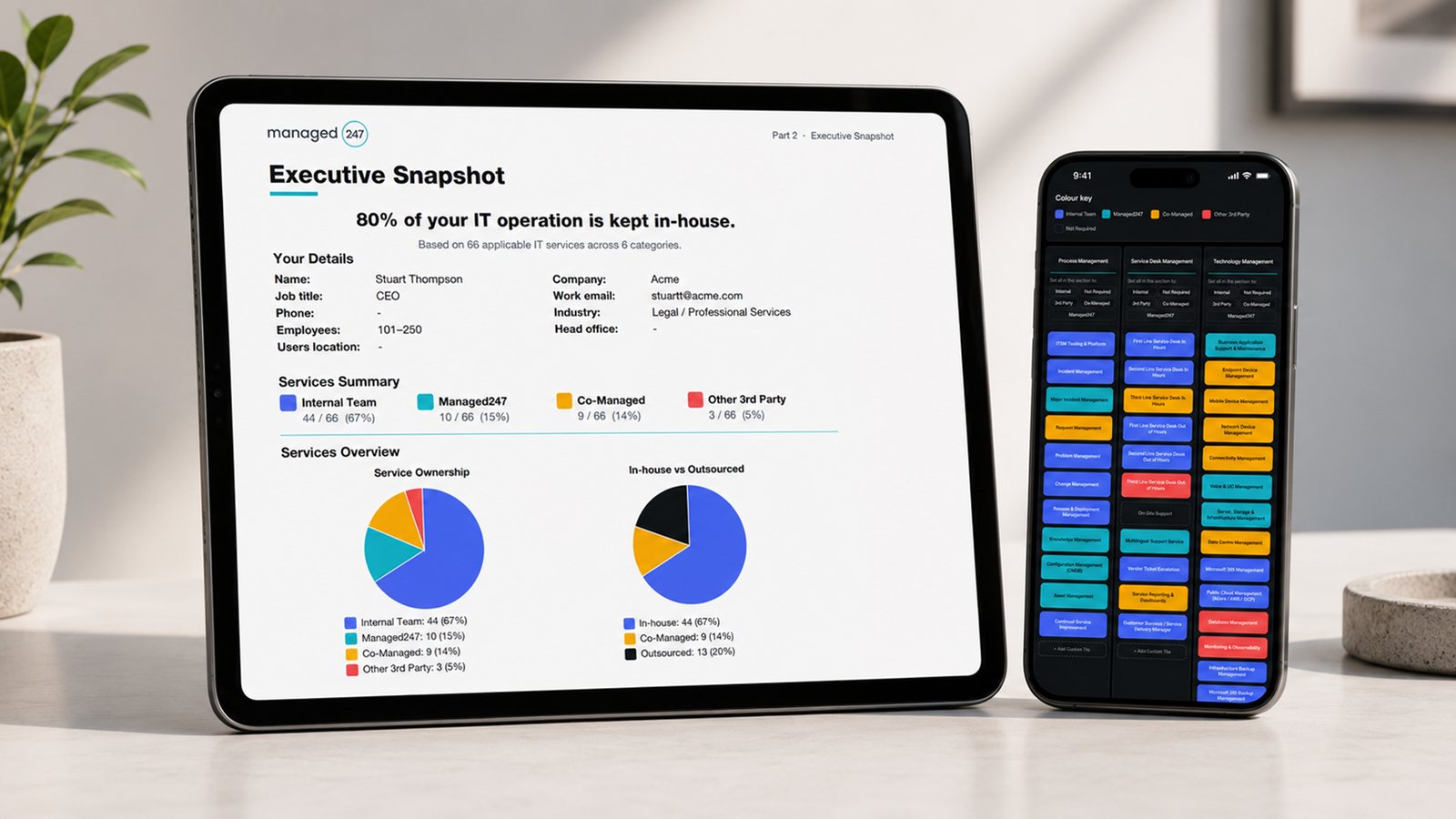
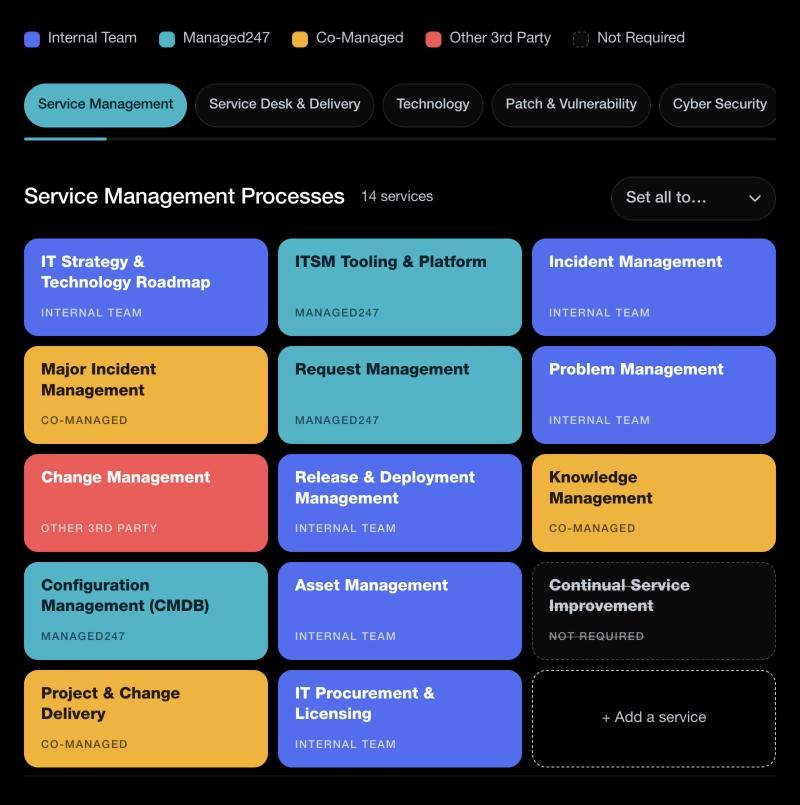
Traditionally, mapping a target operating model takes days or weeks of workshops. Our free Target Operating Model Builder does it in about ten minutes. It covers 72 IT services across six capability areas, laid out as a simple grid, and you click each tile to set who runs it: your internal team, Managed247, a co-managed arrangement, another third party, or not required. There is nothing to install, nothing to pay and nothing to sign up for until you want the report. It works as a living, interactive template you can revisit at any time.
When you are finished, the tool produces an executive PDF report you can share with your board or leadership team. It sets out who runs each service, with a description for every line, the services where delivery is shared, and the next steps to consider. To see what you will receive, open our sample report (PDF). For a fuller method, follow our step-by-step guide to building a target operating model.
What the builder covers
The builder starts from a catalogue of 72 IT services, grouped into the six capability areas below. Every service starts with your internal team, so you only change the ones that sit elsewhere.
- Service management processes (14 services): from IT strategy and the technology roadmap to incident, change, asset and knowledge management.
- Service desk and service delivery (11 services): first, second and third line support, each in hours and out of hours, plus on-site support, multilingual support and service reporting.
- Technology management (15 services): endpoints, mobile devices, networks, connectivity, servers, data centres, Microsoft 365 or Google Workspace, identity, public cloud, databases, monitoring and backup.
- Patch and vulnerability management (10 services): Windows, macOS and Linux patching, application and firmware updates, zero-day patching, vulnerability scanning and risk-based remediation.
- Cyber security management (13 services): security monitoring, managed detection and response, identity threat detection, access and privileged access management, data loss prevention, email and web security, cloud security posture, incident response, phishing simulation, awareness training and penetration testing.
- Governance, risk and compliance (9 services): ISO 27001 and SOC 2 governance, Cyber Essentials, regulatory compliance, risk management, policy, audit support, business continuity, supplier risk and security leadership.
You can see every service, with a short description of each, in our IT service catalogue. Missing something? Add up to five services of your own to each area. To come back another day, use Save progress to keep a file of your work and load it next time.
Internal, managed or co-managed: getting the mix right
Most organisations land on a blend rather than an all-or-nothing choice. A co-managed model keeps your internal team in control of the work that needs their business knowledge, while a managed provider takes on the around-the-clock monitoring, the out-of-hours cover and the specialist escalation that are hard to resource in-house. Managed247 delivers exactly this kind of blended model for mid-market and enterprise organisations across the UK, with a service desk that runs 24 hours a day, 365 days a year and is staffed entirely by UK-based engineers. If your map shows gaps, we can help you close them.
Frequently asked questions
-
What is a target operating model?
A target operating model, or TOM, is a blueprint of how an organisation will operate in the future to deliver its strategy. It covers people and structure, process, technology, information, governance and how services are sourced, and shows how each part works together to deliver value.
-
What is an IT target operating model?
An IT target operating model sets out how the IT function will deliver and govern its services, and who is accountable for each one. Its central question is sourcing: which services sit with the internal team, which with a managed provider, which are co-managed, and which go to a third party.
-
How do you build a target operating model?
You define the services in scope, decide the ownership and sourcing for each, and agree the governance that holds it together. Our free Target Operating Model Builder walks you through the IT services as a simple grid and produces an executive PDF in minutes, rather than the days or weeks a workshop-based approach takes.
-
Is the Target Operating Model Builder free?
Yes. The tool is free to use and there is nothing to install. You only enter your details when you want the executive PDF: we confirm your work email with a one-time link, the report downloads straight away and a copy is emailed to you.
-
What does the Target Operating Model Builder cover?
It covers 72 IT services across six capability areas: service management processes, service desk and service delivery, technology management, patch and vulnerability management, cyber security management, and governance, risk and compliance. You can add up to five services of your own to each area.
-
Can I save my progress and come back later?
Yes. Your work stays on the page until you close it. To come back another day, use Save progress to download a file of your model, then load that file when you return.
-
What is a co-managed IT model?
Co-managed IT is a blend where your internal team stays in control of the work that needs their business knowledge, while a managed provider adds around-the-clock monitoring, out-of-hours cover and specialist escalation. It is often the outcome organisations reach when they map their target operating model honestly.
-
How long does it take to build a target operating model?
With the Target Operating Model Builder, about ten minutes to map all 72 services. A traditional workshop-based exercise can take days or weeks. The tool gives you a board-ready first version straight away, which you can refine with your team.
See where your IT operating model stands.
Build yours free in minutes, or talk it through with our UK team.