Microsoft Copilot agents explained: what they are and what they mean for your business
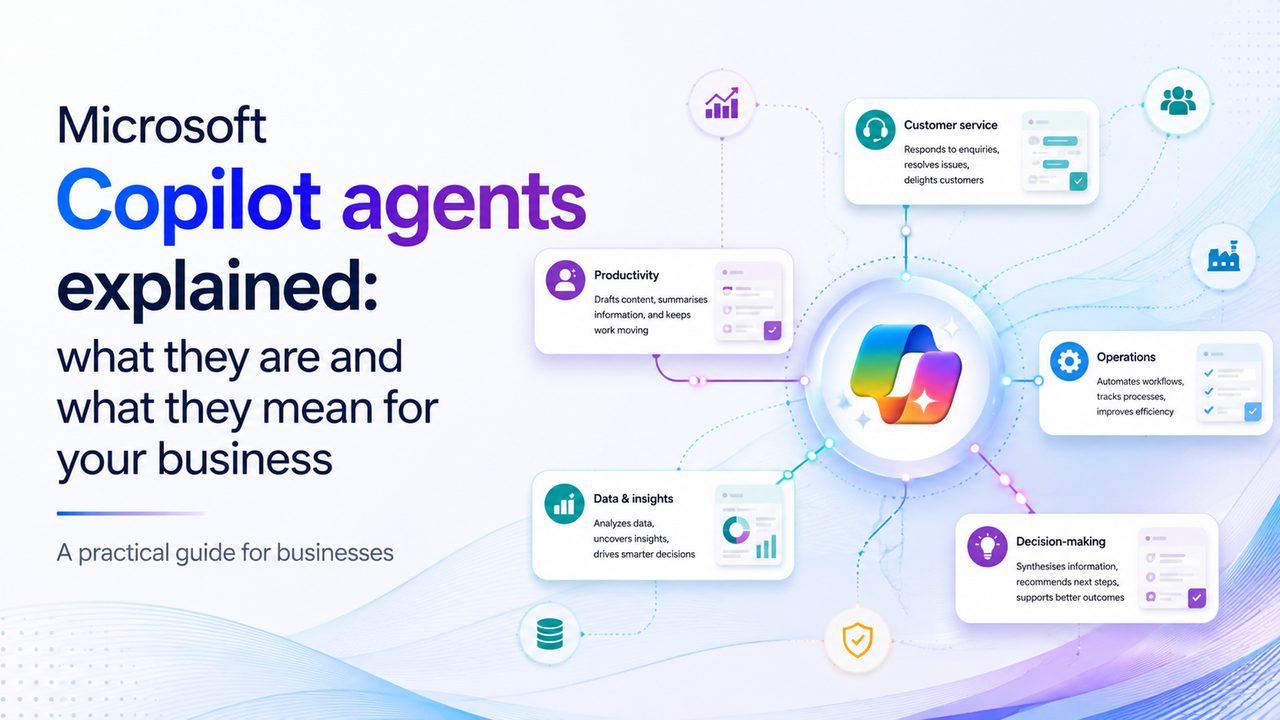
A Microsoft Copilot agent is an AI assistant designed to handle a specific business task, using information and tools available within your Microsoft environment. Instead of simply helping someone write, summarise or answer a question, an agent can be configured to perform a defined job, such as answering HR questions, handling common IT requests, helping onboard new starters or checking the status of invoices.
That shift from asking AI for help to giving AI a job to do is why Copilot agents are becoming such an important part of the Microsoft AI conversation. It’s a fantastic opportunity to create efficiencies in your business – but it’s also important to think carefully about what an agent can access, what it’s allowed to do and who’s responsible for it.
What is a Copilot agent, exactly?
If you’re already familiar with Microsoft Copilot, the easiest way to understand an agent is to think about the difference between a general assistant and a specialist one. Copilot can help you draft an email, summarise a document, analyse information or answer a question, but an agent is more focused. It’s configured around a particular task, set of information or business process.
Think of Copilot as your assistant, and an agent as the assistant you’ve trained for one job and given the appropriate keys to do it. For example, instead of asking Copilot
“Can you tell me what our expenses policy says about mileage?” you could have an HR agent specifically designed to answer questions about your company’s policies and direct employees to the relevant information.
Or instead of asking someone in IT to repeatedly answer the same basic questions, an IT service desk agent could handle common requests and provide employees with approved troubleshooting guidance.
In other words, an agent isn’t just another chatbot. It can be designed around particular instructions, knowledge sources and actions, and can be made available where people already work, including Microsoft 365. If you’d like a broader introduction to all things Microsoft AI, check out our guide to Microsoft Copilot.
What can businesses actually use Copilot agents for?
There’s a tendency to talk about AI agents as if every business is about to hand its entire operation over to autonomous software. But that’s not that helpful in identifying where the most practical opportunities are right now. Instead, think about the repetitive jobs that already consume time across your organisation – those where your business already has information and processes to support an agent. Let’s look at a few examples.
IT service desk
An IT agent could answer common questions about password resets, software access, device set-up or other routine requests using your approved internal documentation. Rather than an employee waiting for someone in IT to respond to a straightforward question, the agent could provide the relevant information immediately and escalate issues that need human intervention.
HR and employee support
HR teams often spend lots of time answering questions about policies, holiday, benefits, expenses and other recurring issues. An HR agent could provide employees with answers based on your organisation’s approved policies and documentation, helping people find information without requiring your HR team to respond to every basic query individually.
Finance
An agent could help identify overdue invoices, answer questions about internal finance processes or flag items that need attention. This reduces the amount of repetitive checking and admin that sits around finance work.
Onboarding
New starters have plenty of questions. Where do I find this document? How do I request access? What is the process for expenses? Who do I contact about my laptop? An onboarding agent could provide a consistent first point of support, drawing on approved company information and helping new employees navigate those first few weeks more easily.
How do you build a Copilot agent?
You don’t necessarily need to be a software developer to create an agent. Microsoft provides Copilot Studio, a platform for building and managing agents. This allows you to configure agents with instructions, knowledge and actions, and to connect them with relevant business information and services.
For a non-technical business user, think of Copilot Studio as the workshop where you define what your agent is for, what information it should use and what it’s allowed to do. It makes it relatively easy to create a simple agent that answers questions from a small collection of approved documents.
However, an agent that can access multiple business systems and take actions on a user’s behalf is a bit more complex and will take proper planning and expertise. Microsoft’s current documentation distinguishes between building agents through Copilot’s Agent Builder experience and using Copilot Studio when more advanced data sources, integrations or security requirements are needed.
The bit many businesses forget to think about: control, security, data
An agent can be useful precisely because it can access information and, depending on how it’s configured, interact with other systems. But that also means security and governance need to be considered from the beginning. Useful questions to ask include:
- Who can create an agent?
- Who can change it?
- What information can it access?
- Who can use it?
- What actions can it take?
- What happens when someone changes the underlying data or leaves the organisation?
To help with this, Microsoft provides controls for managing access, data policies, sharing and security within Copilot Studio. They also recommend restricting access to environments and data stores, applying appropriate data policies and using controlled release processes when moving agents into production.
The underlying Microsoft 365 permissions model is important too. Copilot uses existing permissions boundaries, meaning users should only receive information they’re already authorised to access. But that doesn’t mean you can simply assume everything is secure because it’s Microsoft – you still need good governance. An employee shouldn’t be able to create an agent that inadvertently exposes sensitive information to people who shouldn’t see it. Equally, a well-designed agent shouldn’t be given more access or ability to take action than its job actually requires.
Should your business start using Copilot agents?
Probably, but not by starting with the biggest possible use case. The best candidates are usually processes that are repetitive, relatively well defined and supported by reliable business information.
If your team answers the same 20 questions every week, there may be an opportunity. If employees regularly spend time searching across SharePoint and other Microsoft 365 resources for the same information, there may be an opportunity. And if a process has clear rules, predictable inputs and a well-defined outcome, there may be an opportunity.
Conversely, an agent probably isn’t the right place to start if the underlying process is poorly defined, the source information is unreliable or the consequences of getting an answer wrong are significant.
A sensible approach is to identify one well-defined use case, establish what information and permissions it needs, test it with the people who’ll actually use it and put appropriate governance around it before expanding. Your Microsoft 365 environment, identity management, data governance, security policies and existing workflows all need to work together, and that’s where we can help.
We can work with you to assess where Copilot and AI agents could create genuine value, while making sure your underlying Microsoft 365 environment is ready to support them. Our security and data governance services can also help you put the appropriate controls around the technology as it develops, making sure your business can harness the productivity potential of AI agents without putting your security and data at risk.
If you’d like to explore the potential of Copilot agents for your business, get in touch.
Frequently Asked Questions
-
What is a Copilot agent?
A Copilot agent is an AI assistant configured to perform a specific task or set of tasks. It can be given instructions, access to relevant knowledge and, depending on its configuration, tools or actions that allow it to interact with business systems.
-
Do I need Copilot Studio to create an agent?
Not necessarily. Microsoft provides different ways to create agents, depending on your Microsoft 365 licences and the complexity of what you want to build. Copilot Studio makes creating simple AI agents relatively accessible, while Agent Builder provides more advanced capabilities for building and managing agents, particularly where additional data sources, integrations or controls are required.
-
Are Copilot agents safe?
They can be deployed securely, but they still require proper configuration and governance. Businesses need to consider who can create and use agents, what data they can access, what actions they can perform and how they’re monitored. To help support this, Microsoft provides security, access and data governance controls for Copilot Studio.
-
How much do Copilot agents cost?
There’s no single price for every Copilot agent. Costs depend on the Microsoft licences your organisation already has, how agents are created and how they’re used. Microsoft currently offers several licensing and consumption models, so assess the specific use case first and work from there.